Every devlog
27/05/2025
Every devlog
This is a compilation of all the devlogs I wrote during the development of the game.
Devlog #1 – Laying the Foundations
30/03/2025
Project Kickoff
This marks the first week of development for our VR horror game. Our initial discussions revolved around what kind of experience we wanted to create, and we quickly aligned on a concept that blends nostalgia with psychological horror.
Core Concept ??
Our premise is simple yet unsettling: Imagine playing a childhood favorite game in VR, but something feels off. Is there a ghost in the machine?
We want to recreate the atmosphere of classic gaming environments, evoking a sense of familiarity, but slowly distorting that reality. The aim is to create an unsettling experience where players feel like they're revisiting something from their past, but with the strange feeling that they're not alone.
Technology & Tools ?️
After evaluating our options, we decided to use Unity as our game engine. Unity provides strong support for VR development, along with a flexible workflow that will allow us to iterate efficiently on gameplay and environmental storytelling.
Next Steps ?
With our core concept established, our focus for the coming weeks will be:
- Developing a basic VR prototype with movement and interaction mechanics.
- Designing a level layout that captures the nostalgic yet unsettling feel we aim for.
- Experimenting with subtle horror mechanics to introduce psychological tension.
This is just the beginning, and we are eager to bring this vision to life. Our next update will cover our progress on early prototyping and gameplay mechanics.
Devlog #2 – Strating the developement
06/04/2025
This week was focused on 2 things, defining more precisely the scope of the project and starting the development of the demo.
Scope and features
The idea of the game is to create a VR horror game where the player start playing old games in a retro style but suddenly the game becomes a horror game. The player will have to finish the level to escape form the "chaser". For this demo, we will start by creating a simple level inspiered by one of the most famous retro game: Super Mario Bros. As we don't have the copyright of the game, we will create our own level and gameplay elements to remind the player of the original game while avoiding any copyright issues.
The fact that we will inspire the game form retro (mostly 2D) games will will also try to adapt the gameplay to the work in VR. For example, in VR, jumping is not as easy as in 2D games, it will probably create a lot of motion sickness and break the immersion. So we will try to avoid jumping as much as possible (which will be a bit challenging since the game is inspired by a platformer).
Development
To start the development and adapt the mechanics to VR, I started by implementing the mechanics to break blocks and collect coins. In mario, the player can break blocks by jumping and hitting them with the head. In VR, this is not possible, so I decided to implement a mechanic where the player can break blocks by hitting them with the hand with an haptic feedback. The same can be applied to some enmies. For now we have a simple block that can be broken by hitting it with the hand. When we break a block, it disappears with a simple temporary particle effect.
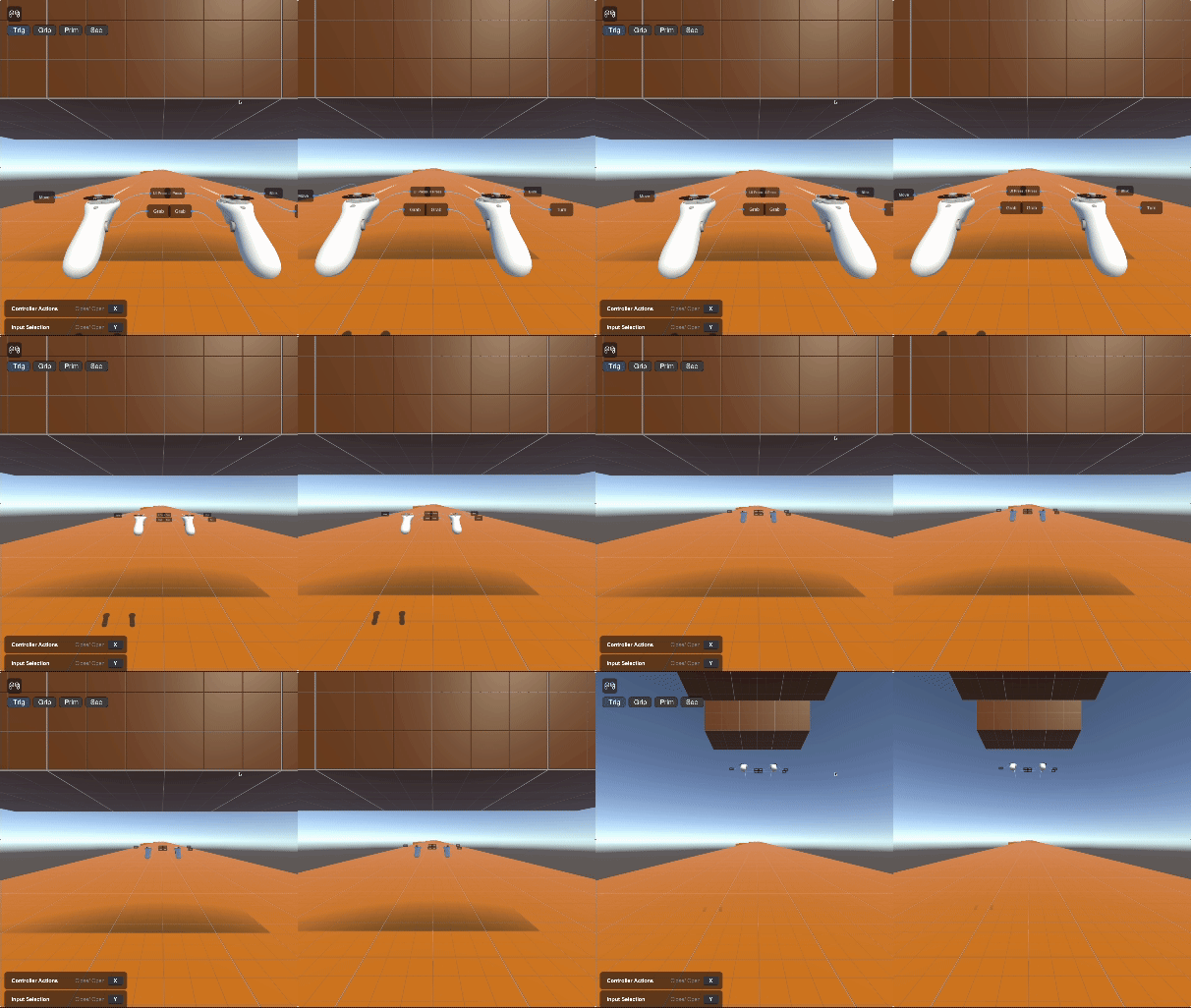
Demonstration of the block breaking mechanic inside the unity VR emulator
Issues
We still have a few issues to solve:
- We found solutions to replace some mechanics that relies on jumping, but we still have to find a solution for the "jumping" mechanic. We will probably use teleportation to move the player in the level but this will be less interesting than jumping as the difficulty will be reduced. We will probably have to find a way to make the player jump in a way that is not too nauseating.
- I don't have access to a VR headset yet, so I will have to test the game on a simulator. This is not ideal as the simulator is far from creating the VR experience (I will probably have my headset in a few days).
- The question is will the game be fun to play in VR? I think that the platformer mechanics will be hard to adapt to VR, but I think that the horror aspect will be more interesting in VR.
Devlog #3 – Preparing the 1st demo
13/04/2025
The demo
This week we had to have something to show the class for our game. So we focused on haveing a really small demo of the hestetic we are going for and re-explain our game concept.
The demo we made consist of a small level that start like a nice, welcoming old platformer game but suddenly the nice blue sky turns into a dark sky and a giant monster appears. Doing that and testing on the meta quest 3s took a lot of time so we couldn’t do much else.
The feedback we got from the class and seeing the other projects make us realize that we need to focus on defining more precisely the game mechanics and add stuff to do in the game. We also need to work on the art style and the level design.
Video of our 1st demo (yes the monster just goes forward and can go through objects we made this demo quite quicly)
What do we plan to do next?
On sunday, we had a meeting to define more precisely what we want to do to improve our game and incorporate the feedback we got. The biggest point was that we all had slightly different ideas of what the game should be and what mechanics we should have (so the game is not just a walking simulator). Here is a few ideas of game mechanics we discussed:
- Small enemies: We want to add small enemies that the player can fight. We think that the player should be able to fight the small enemies and escape the big monster.
- Hiding spots: The large monster will be patrolling the level and start chasing the player when he sees him. The player will be able to hide in small spots to escape the monster. As our first level for the game is inspired by old 2D platformers, we will play with the move from 2D to 3D to add hiding spots.
- Small puzzles: We want to add small puzzles that the player has to solve under pressure to progress in the game (Like a locked door that the player has to open while the monster is chasing him).
- Breaking blocks: As we have a block breaking mechanic in our game, we can use that to add some puzzles. For example, the player can break a block to create a path to escape the monster or to hide from it, or break blocks to collect items.
Devlog #4 - Small combat system
20/04/2025
To make our game more interesting and interactive, we decided to add a small combat system. The player will be able to fight small enemies and escape from the big monster. In the game, there will be small enemies that the player can fight and the big hunter enemy that the player will have to run away from.
To fight the small enemies, the player will have to hit them with the joystick. We also want to add upgrade mechanisms for the player to do more damage to enemies (probably by breaking blocks).
Demo of the current combat system (model and texture are temporary)
When the player hits the little enemies, there's a little haptic feedback in the controller.
What do we plan to do next for the combat system?
- Add behaviour to small enemies (they will attack the player)
- At the moment, enemies don't do any damage to the player, but we'll be adding this feature in the future.
- Add upgrades to the player (for example, the player can break blocks to obtain upgrades)
Devlog #5 - Not so much done...
05/05/2025
The last 2 weeks have been a bit busy for me (with school and some personal stuff), so I haven't been able to work on the game as much as I wanted to. But I did manage to get a few things done:
On the development side:
In the last devlog, I've added a small enemy that the player can punch, this week I've added a power up that the player can collect by punching blocks. The power up increases the player's damage for now and will be used to unlock new abilities in the future. There is no animation/art for the power up yet, but I will add that later.
Player can now collect power ups by punching blocks (increases damage)
In the previous version of the enemy, it wasn't clear when the player punched the enemy, there was a small haptic feedback, but nothing visual. So I added a small particle effect that plays when the player punches the enemy, the particle effect is placed where the player punched the enemy. This was quite easy to implement:
Vector3 hitPoint = other.ClosestPoint(transform.position);
Vector3 normal = (hitPoint - transform.position).normalized;
hitPoint += normal * 0.1f; // Offset the hit point slightly to avoid clipping
Quaternion rotation = Quaternion.LookRotation(normal);
GameObject particules = Instantiate(hitParticle, hitPoint, rotation);
Destroy(particules, 1f); // Destroy the particle effect after 1 second to avoid cluttering the scene
I also created a test map for me during development, this map will not be used in the game, but it will help me test the mechanics of the game. Without the clutter of the actual game map. In the following video, you can see the test map, the player punching a static enemy at differant places and the particle effect playing at the point of impact. The player also punch the small moving enemy (Not developed by me) and the particle effect plays at the point of impact. At the end of the video, you can see the player punching a block and collecting the power up. Then killing the small enemy in one hit.
Test map with the player punching a static enemy and a moving enemy
On the planning side:
The last week we have been meeting with the team to discuss more precisely what we want to do with the game for the demo. We have decided on the map layout and the mechanics we need to implement. We have decided to focus on the mechanics that we really need for this demo level. If we have time, we will add more mechanics, but for now, it is not a priority.
Plans for the next week:
- We have a demo to finish for Wednesday, so I will be focusing on that. In this game we want:
- The player to be able to punch blocks and enemies ✅
- The player to be able to collect power ups ✅
- The player to be able to interact with the environment (such knocking over a pillar, or breaking a wall)
- Having a chasing behavior for the big chaser enemy
- I will also be working on a part that will be important in our demo map, at some point, the map will change (some part of the map wil rotate)
Devlog #6 - Some gameplay interactions
12/05/2025
The week, I focused on implementing some gameplay interactions. The main think I focused on was the interaction with the environment.
Pillar interaction
The 1st thing I did was to implement a system that allows the player knock over a pillar in order to create a bridge to cross a gap.
Knock over a pillar to create a bridge
In order to make it easier to use in real game scene, the prefab for the pillar has a target postion and rotation that is visible in the editor but not in the game.
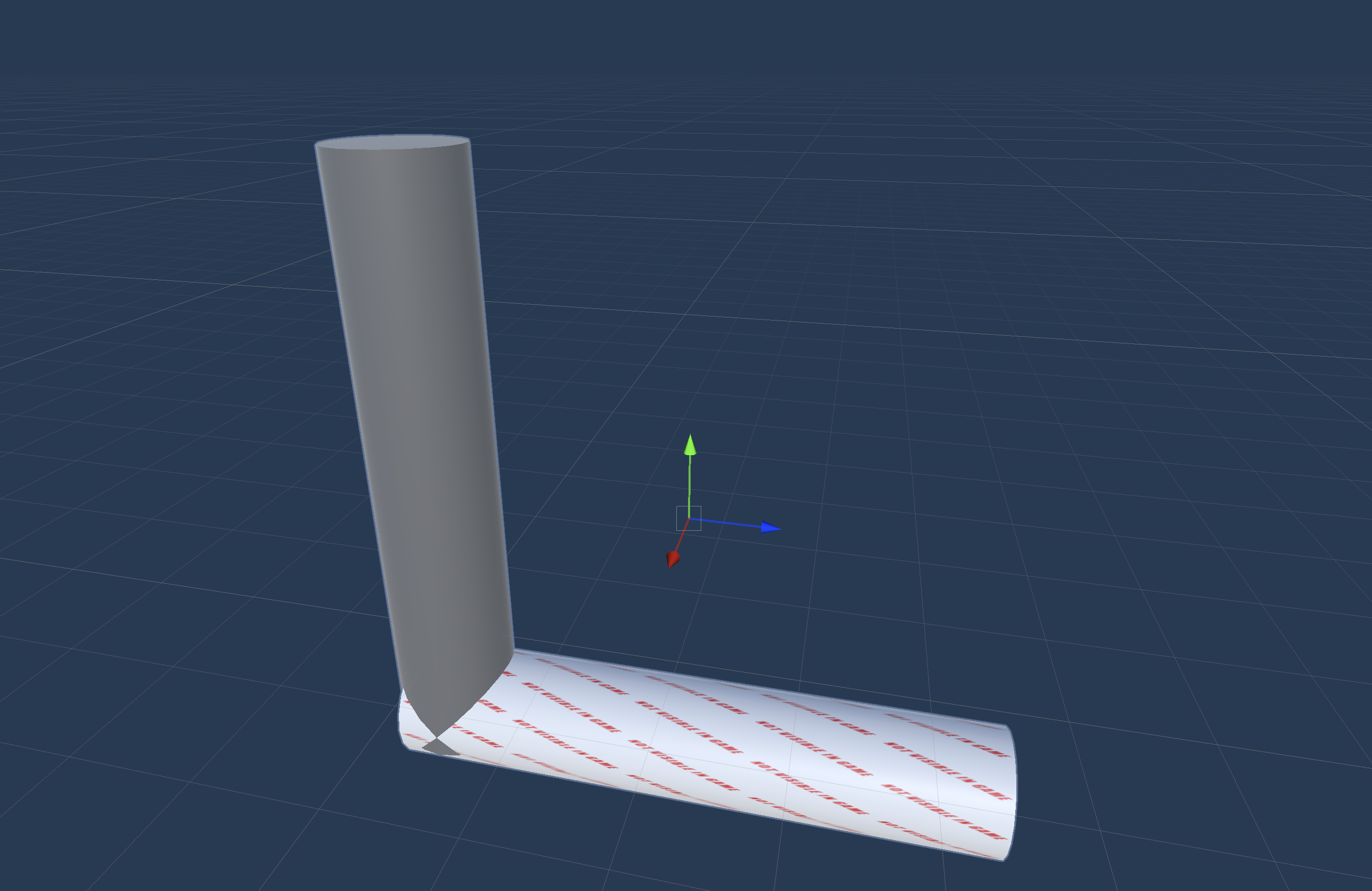 The pillar prefab with the target position and rotation
This allows me to easily place the pillar in the scene and make sure that it will fall in the right direction. The fall part is done using a simple interpolation between the current position and the target position and rotation with a small acceleration to make it look more natural (we need to tune the values a bit more to make it look better).
Something that I also added is a haptic feedback when the pillar is falling. I've used an other system that the other times and I think that it is worth mentioning. For all the other haptic feedbacks until now, I've used HapticImpulsePlayer.SendHapticImpulse form UnityEngine.XR.Interaction.Toolkit.Inputs.Haptics this is good, easy to use and works with a lot of devices. But it is not very flexible and doesn't allow to play a haptic pattern. So I decided to use the meta Oculus.Haptics.HapticSource[1] which allows to play a HapticClip. This is really easy to use but it is not compatible with all devices. To make the haptic clip, I used Meta Haptics Studio[2] which create a haptic clip from an audio file. I used a sound of a falling object and it works really well.
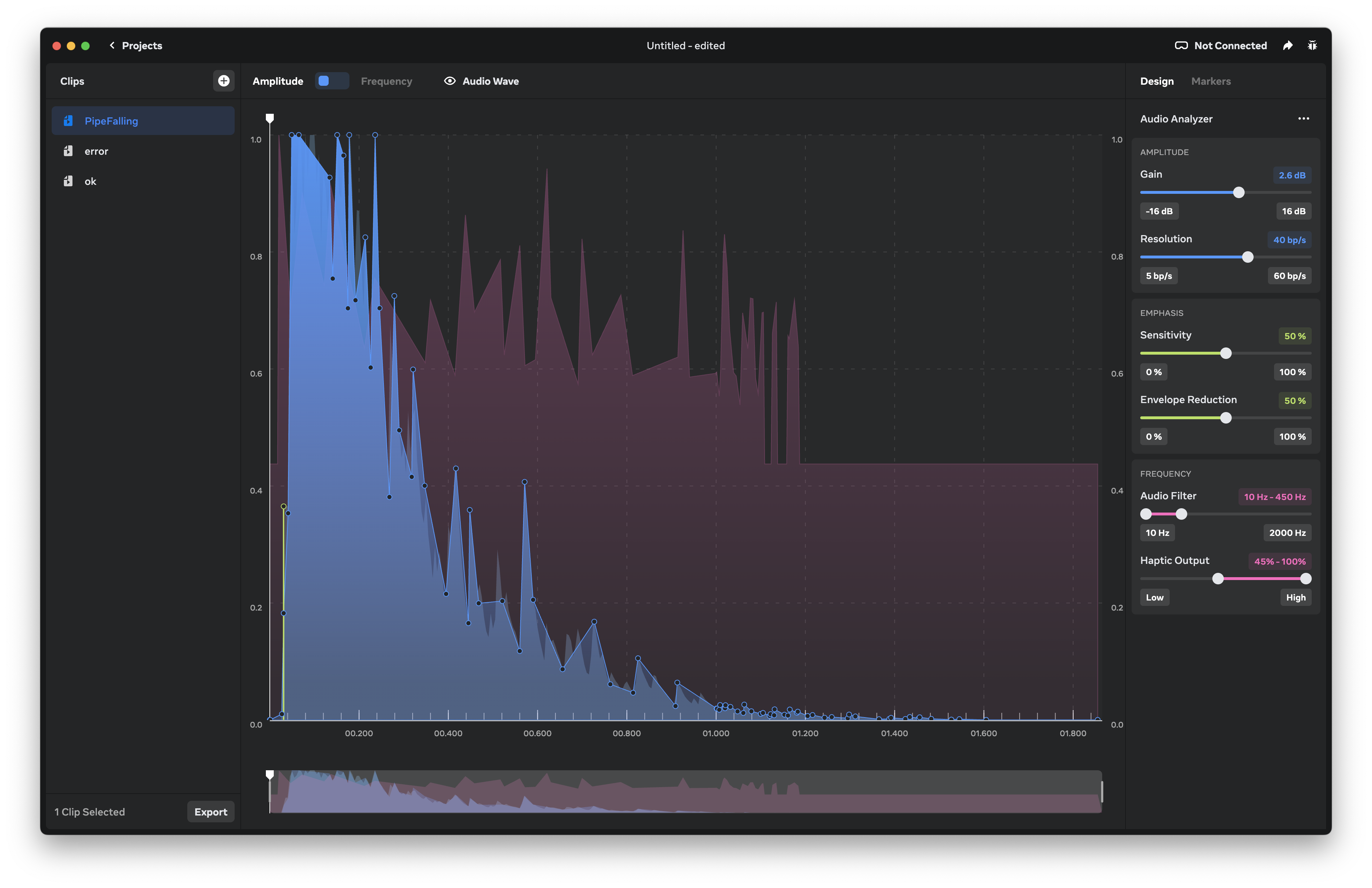 Meta Haptics Studio
With this software, you can create a haptic clip from an audio file and test them on the controller directly, and then export the clip as a .haptic file and use it in the project with a HapticClipPlayer component.
Something that we need to figure out is how to make it work on all devices, this is not something we really need to do now as we target only Meta Quest devices for now, but it is something that we need to keep in mind for the future.
Map rotation
An other thing that I worked was the map change. At some point in the game, segemnt of the map will rearange to create a new path for the player.
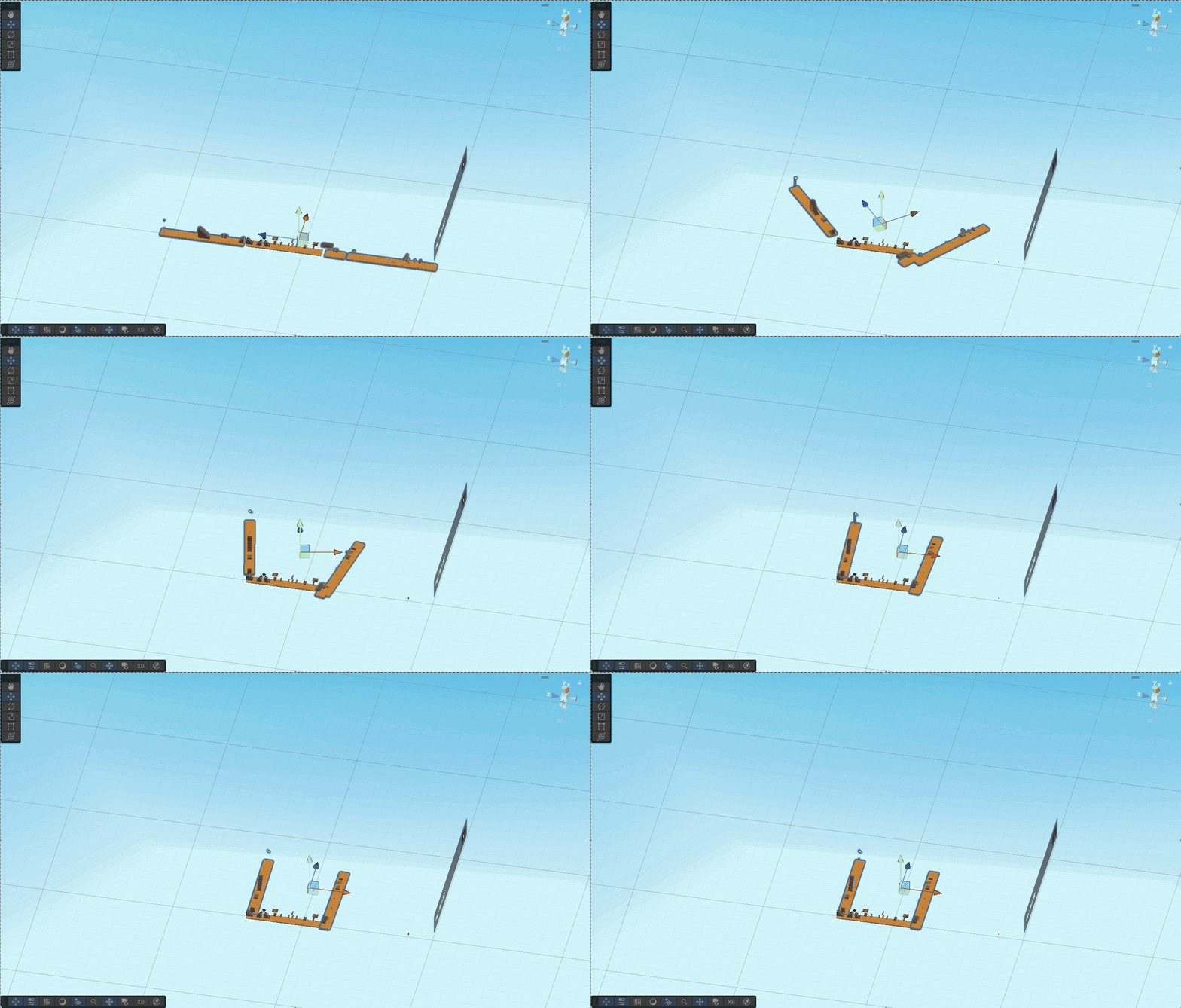 Map rotation view in the editor form above
This is in the same way as the pillar, we have a target position and rotation and we interpolate between the current position and the target position and rotation. The only difference is that we use a Vector3.lerp for the position and a Quaternion.Slerp for the rotation. This make a linear interpolation for the position and a spherical linear interpolation for the rotation. And in game it looks like this:
Map rotation in game
This is an easy way to create a new path for the player and make the level more dynamic and a bit longer without adding a lot of new content. With this system, we need to make sure that the player doesn't fall form the map when the map is changing and add clearer feedback to the player when the map is changing (with sound, visual and haptic feedback).
What to do next
We still have a lot of things to do, before the deadline, here is a list of things that we need to do:
- Add more gameplay interactions (e.g. the player can break a wall to create a new path)
- Add more sounds effects
- Add more visual effects
- Add more haptic feedback
- Add more polish to the game (e.g. add a loading screen, add a main menu, etc.)
- Create more interesting behavior for the enemies
- Add more "puzzles" to the game
[1] Documention of the unity SDK for haptics: https://developers.meta.com/horizon/documentation/unity/unity-haptics-sdk/
[2] Documention for the Meta Haptics Studio: https://developers.meta.com/horizon/blog/haptics-sdk-studio-meta-quest-vr/
Devlog #7 - VR sickness and some other stuff
18/05/2025
Test in VR for the whole team
Since the beginning of the project, I was the only one who tried the game on an actual VR headset. I personally didn't find any sickness or discomfort while playing, but as I'm not everybody and that a lot of people are more sensitive to motion sickness, we wanted everyone in the team could try the game in VR.
So on Tuesday, (almost) everyone in the team tried the game in VR. The result was way better than what I expected. The thing that I was more worried about was the jumping and movement. I was thinking that we would need to lower the speed of the player and the jump height, as well as minimize the number of jumps. But in the end, no one had any sickness from those two things. The only thing that was a bit annoying was the snap turning.
Snap turning vs smooth turning
By default, the unity XR Origin uses snap turning, which allows the player to turn in 45° increments. For some reason this was causing some discomfort. So we decided to change it to smooth turning with a speed of 60°/s. We also added a vignette effect to reduce the field of view when turning (in the same ways as the movment). This wasn't tried by the rest of the team yet, but in my opinion, it should be good (at least it is not worse than the snap turning for me).
Is that all?
Not really. I've also worked on a few other things but it was mostly bug fixes and polishing. First the most important bug fix: The tool tips when looking at the controllers are now correctly labeled!
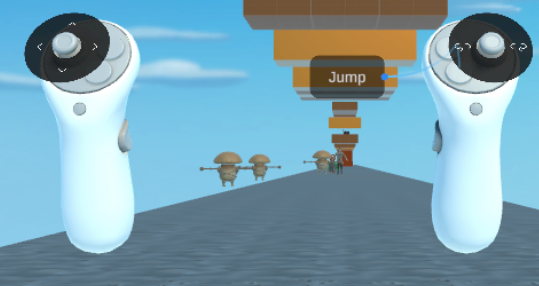
Controller tooltips with the correct labels
Another thing that I fixed was the fact that the camera height was not consistent with the player height, whether you are sitting or standing when you start the game, ... So I fixed that (it was juste changing a dropdown value in the XR Origin and setting the height to 1.7m). So now we don't have to worry about the position of the headset when we start the game.
The last thing that I worked on for this week is 2 bug fixes that are linked together. At first Germaine asked for some help with the sound, she has been working on adding footsteps sounds for the chaser enemy. But no sound was playing. When looking at the code, everything was fine, the issue came from the fact that the sound was triggered with animation events. But the animation was not playing. So I had to fix the bug with the Animator, the issue was that the Animator was too good, it was playing the idle animation if the enemy was not moving, and then had 4 possible animations to play (the 4 directions) but we only have 1 animation for the chaser walking. In order to control that, the animator was using a 2D Blend Tree with 2 inputs: speedv and speedh but those two values were not set in the code. So I replaced the blend tree with a simple 1D blend tree with only the speed as input (as we only have 1 animation for the chaser walking) and set the speed in the code. The blend tree goes form -1 to 1, where -1 is the chaser walking backward (just in case we need that later) and 1 is the chaser walking forward, and 0 is the idle animation. Now the issue is that we don't want the chaser to walk at a speed of 1 (or -1) all the time, so we need to remap the speed to a value between -1 and 1. Unity doesn't have a built-in function for that, so I had to write this little piece of code:
float t = Mathf.InverseLerp(-maxSpeed, maxSpeed, currentSpeed);
float mappedSpeed = Mathf.Lerp(-1, 1, t);
This code remaps the speed from a range of [-maxSpeed, maxSpeed] to a range of [-1, 1]. So now whatever the speed of the chaser, the animation will be played correctly, and the sound will be played at the right time.
As I was there, I also modified the sound script a bit. The version made by Germaine was using a single audio clip for the footsteps (which is not really pleasant to hear), so I added a list of audio clips that are played randomly at each step:a
int randomIndex = Random.Range(0, footstepSounds.Length);
animationSoundPlayer.clip = footstepSounds[randomIndex];
animationSoundPlayer.Play();
This way, the sound is more realistic and less repetitive. The AudioSource (animationSoundPlayer) is attached to the Chaser so the sound is played at the right position, hence when the chaser is far away, the sound is less loud, and when the chaser is close, the sound is louder.
That basically it for this week, focused on some small incremental improvement for the game. I obviously also worked on the GDD, which is not finished yet.
Devlog #8 - Touch-ups for the demo
27/05/2025
This week was the last before the demo, so we focused on what was needed for the demo, mainly bug fixes, optimizations and the addition of an ending for the demo.
Optimizations
There were two things that were really slowing down the game, the first was the way the level was made, it was made of a lot of 1x1x1 blocks, everything from the ground to the stairs and the blocks were made of these 1x1x1 blocks (I didn't count the number of blocks, but a quick estimate would be around 1500 blocks). So for the simple shapes (like the ground) I replaced each section with a single block scaled to the right size, and quickly remodeled the stairs in blender to be made of one single mesh instead of a lot of small blocks. This made the level load much faster and run smoother. This solution is not perfect, as the way the texture is applied in unity makes the side of the road look weird, as you cannot scale the texture differently on each face of the block, but it is good enough.
The other issue was with the music changes, we have some points in the demo where the music changes, and it was causing a lot of lag, as the game loaded and decoded the music. At each music change, the game stuttered for approximately 1 second, which felt really bad. To fix this, I've added to the script start function a single line of code:
newBGM.LoadAudioData(); // preload the musicThis line of code makes the first loading of the scene take a bit longer, but it removes the lag when the music changes.
Fixes
There were a lot of small bugs here and there and I don't want to describe them all as they were not really important, but here is a (non-exhaustive) list of the most important ones:
- The final staircase had no collision
- The small enemies had a collider but they were missing a reference to the controller so they could not be hit
- The breakable blocks were giving the player multiple power-ups at once (which was not intended)
- The power-up was a
Rigidbody(to allow it to fall) but the player could push it around (and off the level), so I allowed movement only on the Y axis - After the rotation of the map, the chaser enemy was not able to move anymore because it used a
NavMeshAgentand the navmesh was not updated, so I added a call toNavMesh.AddNavMeshData(navMeshData_Rot)and generated the navmesh again after the rotation of the map
All those bugs were fixed and there is not a single bug left in the demo (everything left is a few weird behaviors that were obviously planned all along or undocumented features of the game).
Polishing up the demo
The demo was not really polished, we had no way to restart the game (besides quitting and restarting) and as we didn't have time to add a menu, I added a simple script to reload the scene when the player presses three times on the ☰ button of the left controller. This is not ideal, but it is good enough solution for the demo.
I also added the custom model for the chaser enemy and implemented the animations to replace the placeholder model that we found on the asset store.
Also Johann added an end screen that displays text and restarts the game but unfortunately it was not working in VR, so I made a simple scene that displays the text and restarts the game when the player presses the ☰ button of the left controller three times. And I also added a simple scene with the text "Game Over" for when the player is caught by the chaser enemy.
I also changed the speed of the chaser enemy when it is chasing the player, before, the chaser enemy was moving at the same speed as when just patrolling, which made it really easy to avoid, so I increased the speed of the chaser enemy when it is chasing the player to make it more challenging.
Feedback from the demo
People who played the demo were generally positive about the game. Our biggest fear was that people feel VR-sick while playing the game, but it was not the case, even first time VR users were able to play the game without feeling sick. We also got some improvement suggestions, especially on the atmosphere of the game and suggestions to make the game more challenging.
Conclusion
The demo is pretty good and I'm happy with what we achieved in such a short time. It was not my first time using unity but it was my first time making a game in VR, and I learned a lot about how to make a game in VR. I personally think that some of our design choices were not the best, but I think that we made a good game overall.
This game is far from finished and ready to be released, but I think that we have a good base to work on if we want to continue working on it. I think that the fact that we chose to make a VR game was not the best choice, as it is more work than a normal game, and the testing is more difficult, but I think that it was a good experience and I learned a lot about how to make a game in VR.
I also feel that some games from other students felt more polished and finished than ours, but I'm still happy with the result of our work and the team was great to work with.